
Twitch chat games: how to add one to your stream in two minutes
A chat game is a browser source that reads your Twitch chat and turns what viewers type into play. Here is what to look for, and how to get one on stream in about two minutes, with screenshots from the real set-up.
By FLUNG Live team · Updated
What a Twitch chat game is
Most streams already have a few browser sources: an alert box, a chat box, perhaps a goal bar. A chat game is the same kind of thing with a game inside it. It sits in your scene as one layer, reads the messages arriving in your channel, and treats certain messages as moves. A viewer types a number, a word or a short command, and the game responds on screen, usually with that viewer’s name attached.
That last detail matters more than it sounds. People watch streams to be part of something, and seeing your own name appear on the stream is the simplest proof that you are. A good chat game turns a passive audience into players without asking anyone to leave the page, sign up, open a second tab or pay for anything.
There are two broad families. Downloadable games run on your PC as a separate program and capture into OBS like any other game; they often need a Twitch login inside the game and sometimes a bot account. Browser-source games are a web page you paste into OBS as a source. They need nothing installed, update themselves, and can be removed by deleting the source. Everything in this guide is about the second kind, because that is what FLUNG Live makes.
How to choose one
Before adding any chat game to your stream, it is worth checking five things. They are the difference between a game that lifts a quiet Tuesday and one that you switch off after a single round.
- How hard is it to join? Games that take one message to join do well. If viewers have to learn a command list before they can play, most will watch rather than join. In SIZE SHOCK and WORLD SHOCK a viewer types one number; in HIVE MIND, one short answer.
- Does it work with a small chat? A game that needs fifty people to be fun is no use to a stream with eight. Guessing games scale down well, because the closest guess wins whether two people play or two hundred.
- What stops trolls? Look for hidden guesses (so nobody can copy), a sensible way to combine answers, and filters for links and blocked words. The SHOCK games combine chat’s guesses with the median, so one person typing a silly number cannot drag the result. HIVE MIND only shows answers that several people gave.
- What does it need from your account? Some games ask for a Twitch login with wide permissions. SIZE SHOCK, WORLD SHOCK and HIVE MIND only read your public chat, so the link carries nothing secret and records nothing on our servers.
- Can viewers win without paying? If gifts or Bits buy points, the game quickly becomes a leaderboard of spending. In the FLUNG games a gift is celebrated, but it never changes a score.
Set-up in two minutes
These steps use SIZE SHOCK, the guessing game where two things appear at the same size and chat guesses how many of the small one make the big one. WORLD SHOCK and HIVE MIND work exactly the same way from their own game pages.
- Make your link. Open the SIZE SHOCK page, scroll to “Set it up in three steps” and type your Twitch channel name. The page builds your browser-source link on the spot; nothing is sent anywhere. Press Copy OBS link.
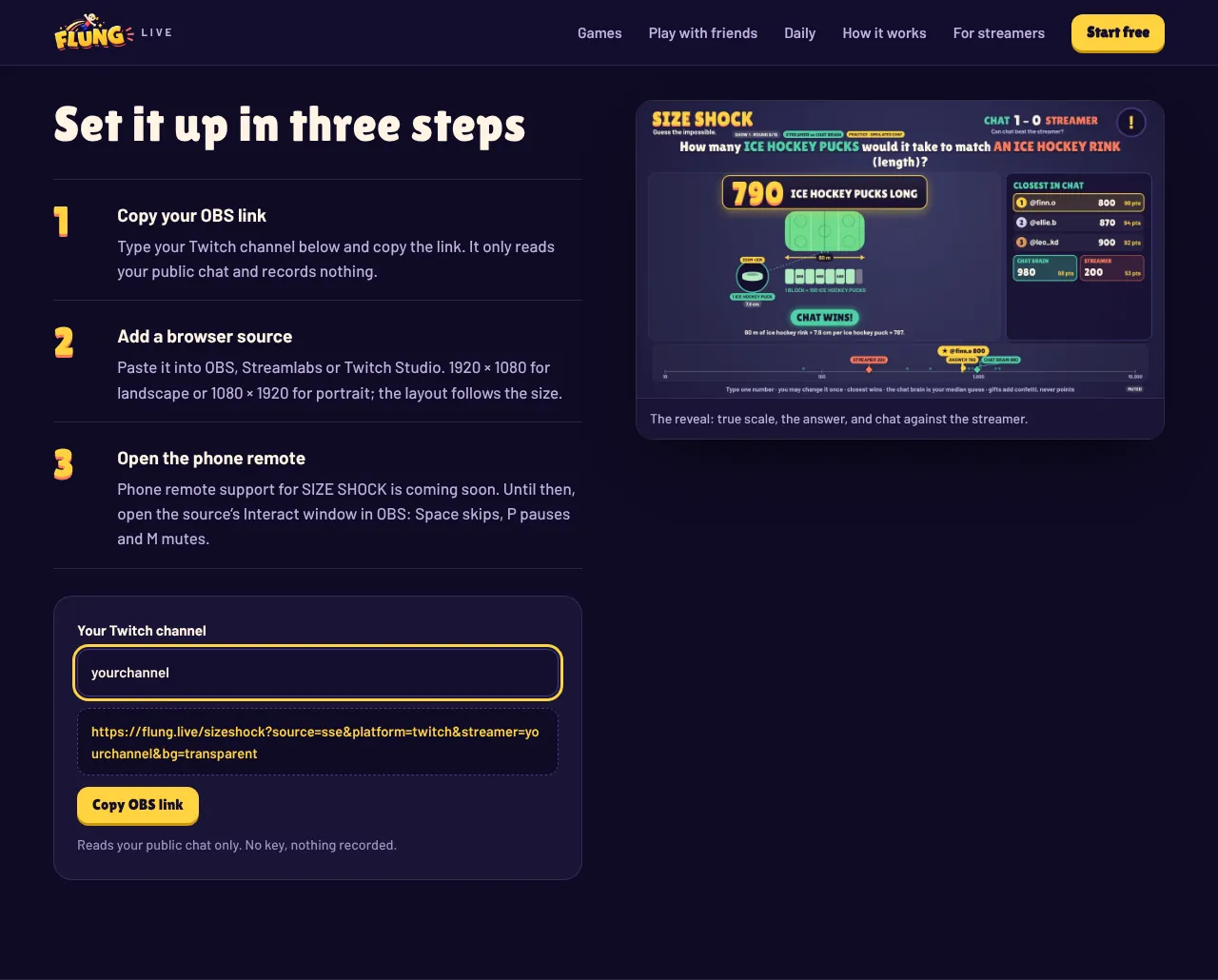
Type your channel name and the link appears underneath, ready to copy. - Add a browser source. In OBS Studio, click the + under Sources, choose Browser, give it a name such as “SIZE SHOCK” and paste the link into the URL box. Set the width and height to match your canvas: 1920 × 1080 for a landscape stream or 1080 × 1920 for portrait. The game reads the size and picks the right layout. Streamlabs Desktop and Twitch Studio have the same kind of source.
- Check the layer order. Put the game where you want it in the Sources list. Most streamers keep their camera above it so their face stays visible. The background is transparent, so your scene shows through.
- Test it with chat. Go live (or use a test stream), type a number in your own chat when a question is up, and watch it lock in with your name. That is the whole set-up.
Running your first show
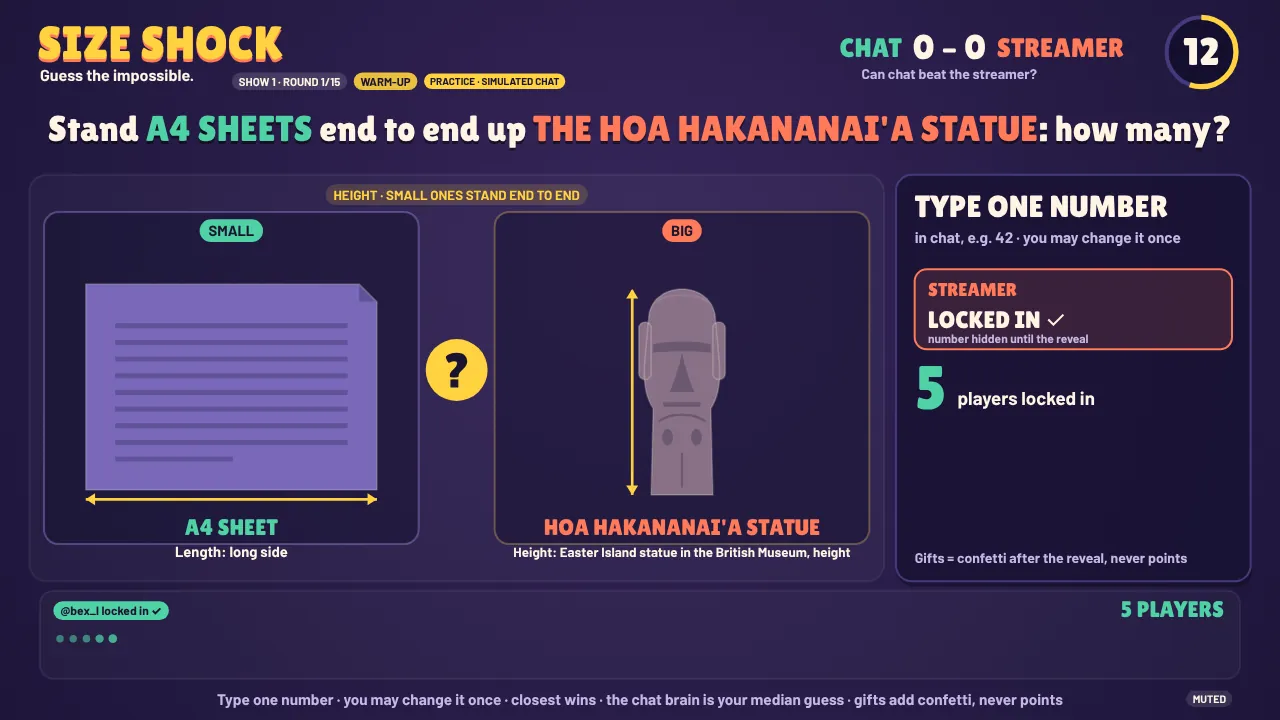
A SIZE SHOCK or WORLD SHOCK round lasts 37 seconds, and a 15-round show runs about ten minutes. That length is deliberate: long enough to build a story (who is leading, can chat beat you), short enough to drop between matches, at the start of a stream while people arrive, or as a break in a long session.
A few things make the first show land:
- Say the rule out loud once. “Type one number in chat, closest wins.” That is all most viewers need. The overlay repeats the rule along the bottom.
- Play along. You get one locked guess per round, hidden until the window closes. Chat’s combined answer, the Chat Brain, goes head to head with yours. Losing to your own chat is part of the fun.
- React to the reveal. The view snaps to true scale and the answer builds. This is the moment to read out the closest viewer’s name.
- Use the controls. Right-click the source in OBS and choose Interact: Space skips, P pauses and M mutes. Phone remote support for the SHOCK games is coming soon.
If your chat prefers words to numbers, try HIVE MIND: a prompt such as “name a pizza topping” appears, everyone types one answer, and the answers merge into bubbles. There are no right answers, only the crowd, and you score for predicting chat’s number one. For pure chaos, FLUNG Island splits chat into Protectors and Attackers around your hero.
If something looks wrong
Nearly every problem with a browser-source game comes down to one of four things:
- Guesses are not showing. Check the channel name in the link is spelt exactly as your Twitch URL. If your chat is in followers-only, subscribers-only or emote-only mode, only those viewers can play.
- The layout is squashed. The source width and height do not match your canvas. Use 1920 × 1080 or 1080 × 1920 and let OBS scale the source, rather than resizing the layer by dragging.
- The background is solid. Make sure the link still ends in
bg=transparentand that no custom CSS in the source properties sets a background. - It restarts every time you switch scenes. In the source properties, untick “Shutdown source when not visible” and leave “Refresh browser when scene becomes active” unticked.
Our OBS browser source guide goes deeper on sizes, sound and performance. If you would like to see a game before touching OBS at all, play the demo with simulated chat.
Questions
Do Twitch chat games need a bot or a mod account?
Not for SIZE SHOCK, WORLD SHOCK or HIVE MIND. The overlay reads your public chat directly, so there is nothing to invite to your channel and no bot posting in chat.
Do my viewers need to sign up or install anything?
No. Viewers play by typing in the chat they are already in: a number for the SHOCK games, a short answer for HIVE MIND.
Will a chat game slow my stream down?
It runs as one OBS browser source, like an alert box. If your machine already handles alerts and a webcam, a browser source of this size is usually fine; close the source when you are not using it.
Is it free?
Yes. FLUNG Live is free during the beta, with no card needed.
Does it work on YouTube, Kick or TikTok?
Twitch is live now. YouTube, Kick and TikTok are coming soon, and you can join the waitlist to hear when they open.