
Online party games on your phone: no app, no sign-up
A good party game now needs nothing more than the phones already in everyone’s pockets. Here is what makes a good phone party game, and exactly how to host one with FLUNG Party, in the same room or spread across countries.
By FLUNG Live team · Updated
Why phones make great controllers
For years, party video games meant gathering around one console and passing controllers. Phones changed that. Everyone already owns one, already knows how to use it, and has a private screen, which is exactly what guessing and quiz games need: you can type your answer without the person next to you seeing it.
The browser has caught up too. A web page can now handle real-time play, so a party game no longer needs an app. That removes the most awkward moment of any game night, the five minutes where someone’s phone is out of storage or the app store wants a password. With a browser game you send a link, people tap it, and they are in.
Phones also free a party from a single room. If everyone is on their own screen, it does not matter whether they are on the same sofa or in different countries on a video call. The same game works for both.
What makes a good phone party game
- Joining takes seconds. A link or a short code, a name, done. No accounts.
- The rules fit in one sentence. “Type one number, closest wins” is something a seven-year-old and a grandparent both get straight away.
- Everyone plays every round. Turn-based games leave most people waiting. In FLUNG Party every player answers every question at the same time.
- Knowledge is optional. Trivia rewards whoever knows the most facts. Estimation and crowd-matching games reward instinct and reading the room, so mixed ages compete on level terms.
- The reveal is the fun part. A good party game builds to a moment everyone watches together, and gives you something to laugh about afterwards.
How to host a FLUNG Party game
- Open the Party page and host a game. Go to flung.live/party on your phone, type your name, and pick a game: SIZE SHOCK, WORLD SHOCK, HIVE MIND or MIXED. Choose 5, 8 or 12 rounds, and whether everyone plays for themselves or in teams.
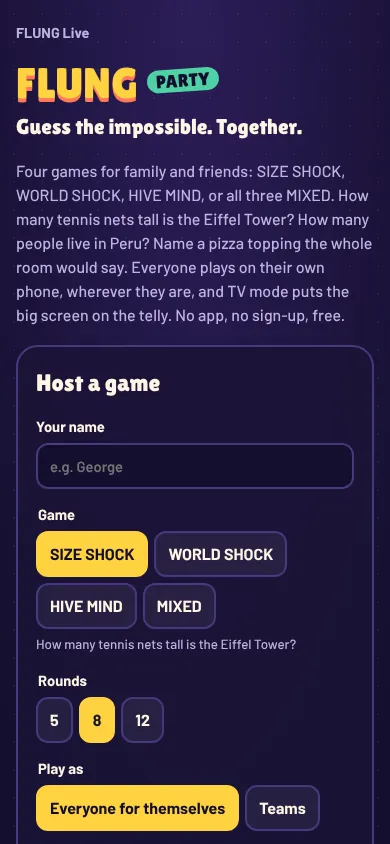
Hosting takes one screen: your name, a game, rounds and teams. - Share the link or code. The lobby shows a six-character room code, a QR code and buttons to share on WhatsApp or copy the link. People in the room can scan the QR; people elsewhere tap the link.
- Wait for names to pop in. Each player types a name and picks an avatar on their own phone. Up to 20 people can play in one game, and anyone who arrives late plays from the next round.
- Press Start. The host plays as a normal player too, with a small host bar for Start, Skip and End.
The games
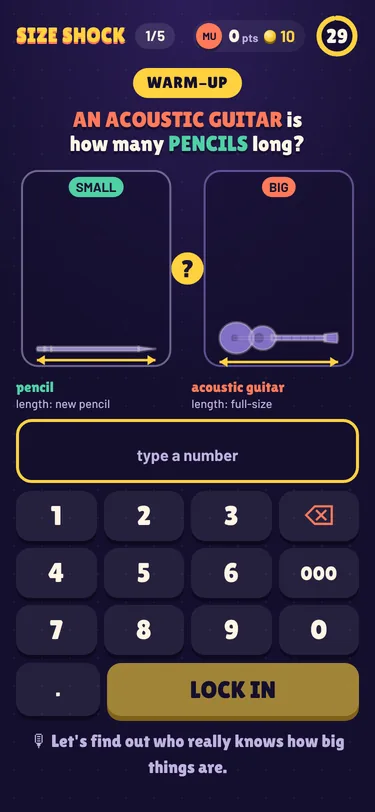
SIZE SHOCK shows two things at the same size and asks how many of the small one make the big one. How many tennis nets tall is the Eiffel Tower? Then the view snaps to true scale and every player’s guess is drawn as a stack next to the real thing. More about SIZE SHOCK.
WORLD SHOCK asks one number about the planet: how many people live in Peru, how far apart two capitals are. Answers come from official sources with the year shown. More about WORLD SHOCK.
WEIGHT SHOCK draws two things at the same size, so you cannot see what they weigh, and asks how many of the small one weigh as much as the big one. Some rounds are quicker: just tap the heavier one. More about WEIGHT SHOCK.
HIVE MIND has no right answers. Name a pizza topping the whole room would say; the more people match you, the more you score. More about HIVE MIND.
LETTERBLAZE (new, in beta) is a board game for two teams: pick a letter on a honeycomb, answer a clue that starts with it on your phone, and light the cell. The first team to link its two sides wins the board. More about LETTERBLAZE.
MIXED rotates SIZE, HIVE MIND, WORLD and WEIGHT round by round, with a LETTERBLAZE letter clue in 8- and 12-round games. It is a good default for a group that has not played before, because everyone finds a round that suits them.
About one round in four in the SHOCK games is a quick round: spot the true statement out of three, or put three things in order. There is no speed bonus anywhere; a careful answer is worth as much as a fast one.
Adding a TV screen
A TV is optional, but in a room it makes the reveal a shared moment. Open the TV link from the lobby on any browser that can reach a TV: a smart TV’s browser, a laptop plugged in with HDMI, or a tab cast from your computer. The TV shows the big view: the room code and QR in the lobby, the question, and the reveal at full size. It never shows anyone’s answer before the lock.
Playing apart on a video call? Keep the call on faces and let everyone watch the reveal on their own phone, or share the TV view from a laptop if you prefer one big picture.
Hosting tips
- Start with 5 rounds. Short first games let people learn, then ask for a rematch.
- Try teams with a big group. Split into two to four teams. In Huddle mode each team sees its own members’ numbers for a few seconds and agrees one answer, which gets people talking.
- Use Gentle mode with children. It swaps teasing captions for neutral ones.
- Chips are just for fun. Players can back themselves with chips, which are free, reset every game and have no money or prize value.
- Play the rematch. At the end you can rematch the three questions the group got most wrong, which tends to be the loudest round of the night.
Planning a call with family rather than a party? Our guide to games to play over a video call with family covers mixed ages and time zones.
Questions
Does everyone need to download an app?
No. FLUNG Party runs in the phone browser. Players open the link or type the six-character code and pick a name.
How many people can play?
Up to 20 players in one game, in free-for-all or in two to four teams.
Do we need a TV?
No. Everyone plays on their own phone, the host included. The TV screen is optional: open the TV link on any TV browser or laptop, or cast it.
Is it free?
Yes. There is no sign-up and no payment. The chips in the game are free, reset every game and have no money or prize value.