
Games to play over a video call with family
A family video call can drift into the same three questions. A simple game gives everyone, from the youngest to the oldest, a reason to lean in. These are games that work over any video call app, across ages and across time zones.
By FLUNG Live team · Updated
What works on a family call
Video calls have a few quirks that rule out a lot of games. Sound lags, so anything that depends on who shouted first is unfair. Screens are small, so games that need everyone to read a shared board are hard. And families span ages, so trivia tends to become a contest between whoever reads the most.
The games that work well share three features:
- Everyone answers at once, privately, so lag does not matter and nobody copies.
- Instinct beats knowledge, so a nine-year-old can beat their uncle.
- There is a reveal, a moment everyone reacts to together, which is what the call is really for.
A guessing game on everyone’s phone
The simplest set-up is a guessing game where every person plays on their own phone while the call carries on as normal. FLUNG Party does exactly this, in the phone’s browser, with no app and no accounts.
- One person hosts. Open flung.live/party, type a name, and pick SIZE SHOCK, WORLD SHOCK, HIVE MIND or MIXED.
- Send the link in the family chat. The lobby has a WhatsApp button. Grandparents tap the link, type their name, and they are in.
- Everyone guesses privately. How many tennis nets tall is the Eiffel Tower? How many people live in Peru? A keypad on each phone, one lock-in, one change.
- React together. The reveal draws everyone’s guess at true scale next to the real answer. This is where the call comes alive.
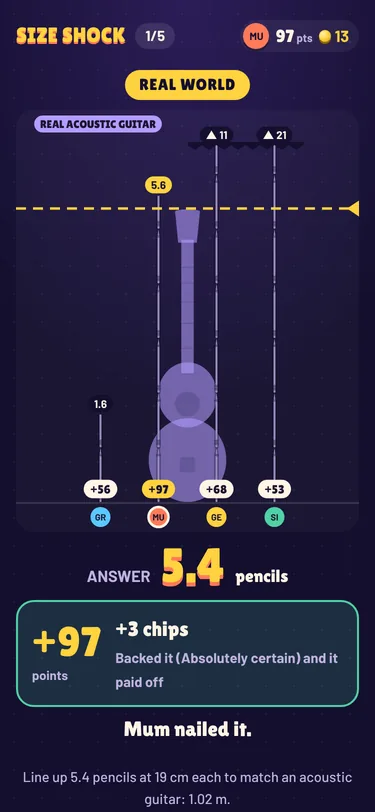
Scoring is by closeness, not by being exactly right: an exact answer scores 100, twice too high or low scores 69, and ten times off still scores 40. Nobody ends on zero, which matters with children. Gentle mode swaps every teasing caption for a neutral one.
Up to 20 people can join one game. With a big family, try two to four teams. In Huddle mode each team agrees one answer together, which gets cousins in different countries talking to each other.
A crowd quiz
Some families love the TV quiz format where you guess the most popular answer rather than the correct one. HIVE MIND brings that to phones. A prompt appears (name a pizza topping, something you take on holiday, a famous scientist), everyone types one answer, and the answers merge into bubbles sized by how many people said them. Match the crowd to score.
It is a surprisingly revealing game for a family. You quickly find out who thinks like everyone else and who is gloriously on their own. Typos and UK or US spellings join the right bubble, so nobody loses points for spelling. Pick HIVE MIND when you host, or MIXED to rotate it with the guessing games. More about HIVE MIND.
A shared daily puzzle
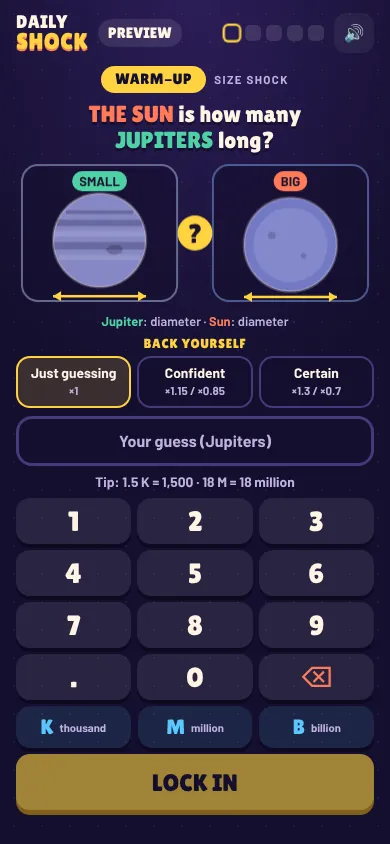
When everyone cannot be on the call at the same time, a daily puzzle keeps a game going between calls. DAILY SHOCK is five questions about the real world, the same five for everyone that day. Each person plays in their own time and shares a spoiler-free row of coloured tiles in the family chat. It takes a couple of minutes and gives you something to compare next time you talk.
No-kit classics
Not every round needs a screen. These work on any call, with nothing to set up:
- Twenty questions. One person thinks of something; everyone else asks yes-or-no questions. Works well with young children as the thinker.
- Show and tell scavenger hunt. Call out “something blue”, “the oldest thing in your house”, and everyone has a minute to fetch it. Grandparents usually win “oldest”.
- Would you rather. Take turns asking; everyone answers at the same time by holding up one or two fingers, which avoids lag.
- Story chain. Each person adds one sentence to a story. Agree the order first so people do not talk over each other.
Planning the call
- Send the link before the call. Ask people to open it once so your opening game starts smoothly.
- Keep games short. Five rounds take a few minutes, leaving plenty of time to talk.
- Mind the time zones. Phone games do not care where you are. The daily puzzle changes at midnight UTC, so it can be a morning game in one country and an evening game in another.
- Let the youngest host. Children love being in charge of Start and Skip, and it keeps them engaged.
For a bigger get-together in one room, see our guide to online party games on your phone, which covers putting the big screen on a TV.
Questions
What is a good video call game for mixed ages?
A guessing game. Nobody needs special knowledge, a child’s wild guess can beat an adult’s careful one, and closeness scoring keeps everyone in it.
Do we need to share a screen?
No. With FLUNG Party everyone sees the question and the reveal on their own phone, so the call stays on faces. Screen sharing the TV view is optional.
Can grandparents join easily?
Yes. Send the link on WhatsApp; it opens in the phone browser with no app or account. They type a name and they are in.
Can we keep it gentle for children?
Yes. Gentle mode swaps every teasing caption for a neutral one.